Requesting an RMA (Return Material Authorization)
A Rmoni device not functioning optimally? We’re happy to help you. These instructions will explain how the RMA process works and how to submit a request. This process ensures that your return is registered correctly and handled through our official procedure.
When should you request an RMA?
You can submit an RMA request if:
- A device is malfunctioning or damaged
- You suspect a hardware defect
- You have received a wrong item
- You need a product to be inspected by our technical team
How the RMA process works
- Step 1) Complete the RMA form
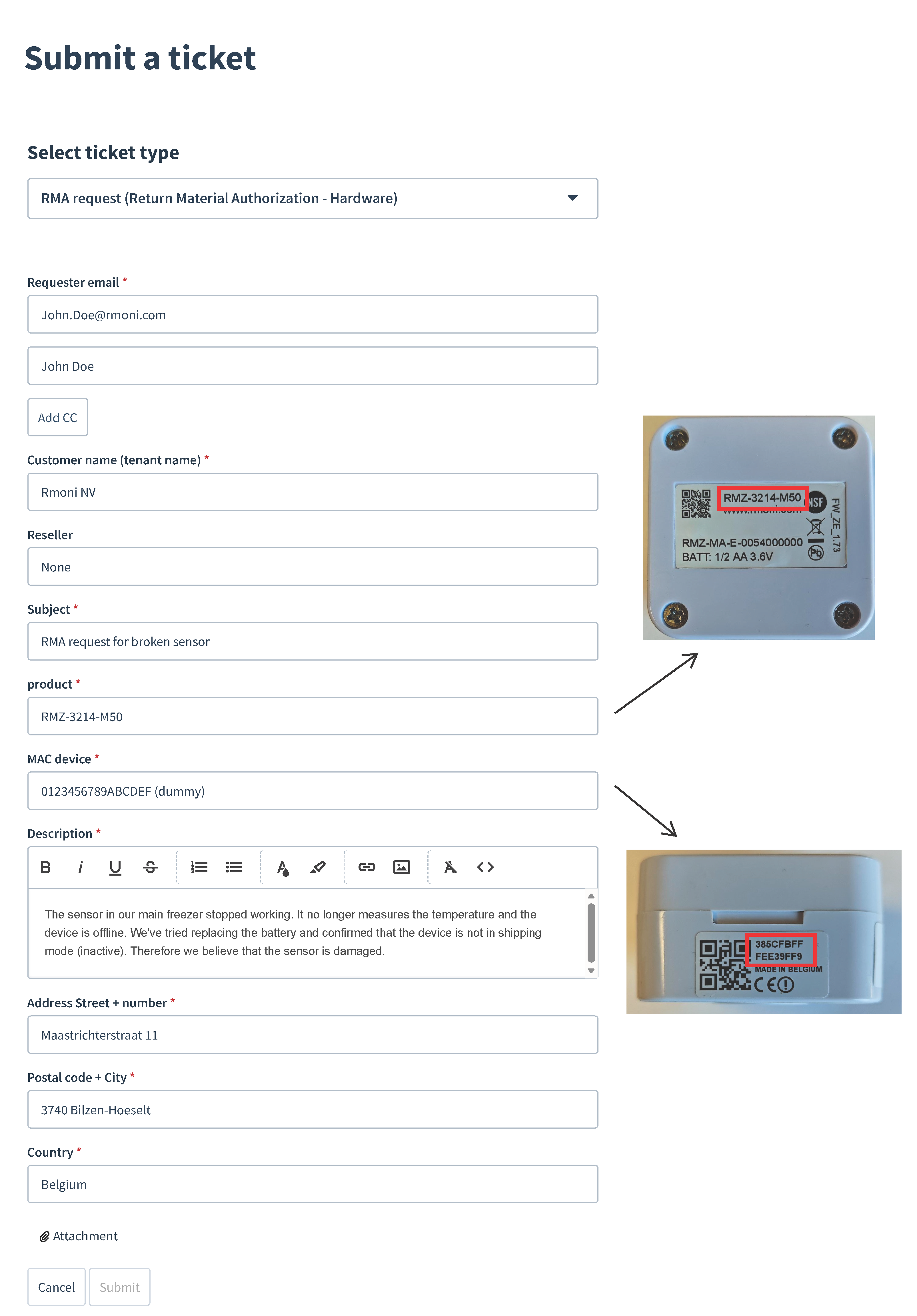
Fill in all required fields, including device details, MAC address, and a clear description of the issue. Pictures can always be added in case this would be relevant.
Please visit the following link for your RMA Form: Click here
- Step 2) Review of the submissing + providing next steps
After submission, our support team will evaluate your request.
- Our agent will contact you if additional information is required or if this can be resolved remotely.
- if approved, we will provide an RMA number along with shipping instructions. Please make sure to include this RMA number with your return shipment.
- Step 3) Send the device to us
Carefully package the device to avoid further damage. Devices returned without an RMA number cannot be investigated.
- Step 4) Rmoni Inspection and processing
Our technical team will inspect the device. Depending on the findings, we will repair, replace, or provide a follow‑up report.
- Within Warranty: If the issue is covered by warranty, we repair or replace the device free of charge. No invoice is sent, the new device is returned to you as soon as possible.
- Outside warranty: If it turns out that the issue is not covered by warranty, we send you a quote for the repair costs. You decide whether to proceed, buy a new sensor etcetera. An invoice is only sent after your approval.
- Step 5) Return shipment
Once completed, the repaired/new device will be returned to the adress mentioned in the RMA form.
The following article (click here) will guide you to start monitoring your installation in case the Rmoni device has been replaced.
Not sure what to fill in at step 1? Check out our example form below:
Was this article helpful?
That’s Great!
Thank you for your feedback
Sorry! We couldn't be helpful
Thank you for your feedback
Feedback sent
We appreciate your effort and will try to fix the article